
If you are starting your journey in MATLAB, easy MATLAB project tutorials are a perfect way to learn. MATLAB is a versatile tool used widely in engineering, data analysis, image processing, and scientific research. Its ability to handle mathematical operations, visualize data, and automate tasks makes it essential for students, researchers, and professionals.
The best way to learn MATLAB is by doing hands-on projects. By working on small, beginner-friendly projects, you can understand the basics of MATLAB programming, improve your problem-solving skills, and gain practical experience. In this guide, we will cover detailed easy MATLAB project tutorials, practical tips, and step-by-step instructions to help you get started.
Why Easy MATLAB Projects Are Important

Starting with easy projects has several advantages:
- Builds Strong Foundations: Simple projects help you understand MATLAB syntax, commands, and basic functions.
- Boosts Confidence: Completing small projects gives you confidence to tackle more complex tasks.
- Encourages Experimentation: Easy projects allow you to modify code, test different functions, and learn through trial and error.
- Practical Application: Projects like data analysis, plotting, or image processing show you how MATLAB is used in real-world scenarios.
List of Easy MATLAB Project Tutorials
Here’s a detailed list of beginner-friendly projects you can start with:
1. Basic Calculator Project
Description: Create a simple calculator that can perform addition, subtraction, multiplication, and division.
Step-by-Step Guide:
- Take user input for two numbers.
- Ask the user to choose an operation (+, -, *, /).
- Perform the selected operation using if-else statements.
- Display the result using the disp() function.
Skills Learned: Variables, user input, conditional statements, basic arithmetic, and output formatting.
Why It’s Useful: Understanding how MATLAB handles user input and basic operations is a foundation for larger projects.
2. Plotting 2D and 3D Graphs
Description: Learn to plot simple 2D and 3D graphs like sine, cosine, polynomial, and surface plots.
Step-by-Step Guide:
- Define the range of values using linspace() or arrays.
- Use plot() for 2D graphs and surf() for 3D surfaces.
- Add labels (xlabel, ylabel, zlabel), titles, and grid lines for clarity.
- Experiment with multiple plots on a single graph using hold on.
Skills Learned: Data visualization, plotting functions, graph customization, and multi-dimensional plots.
Why It’s Useful: Graphs help you analyze data visually, a critical skill in engineering and research.
3. Temperature Converter
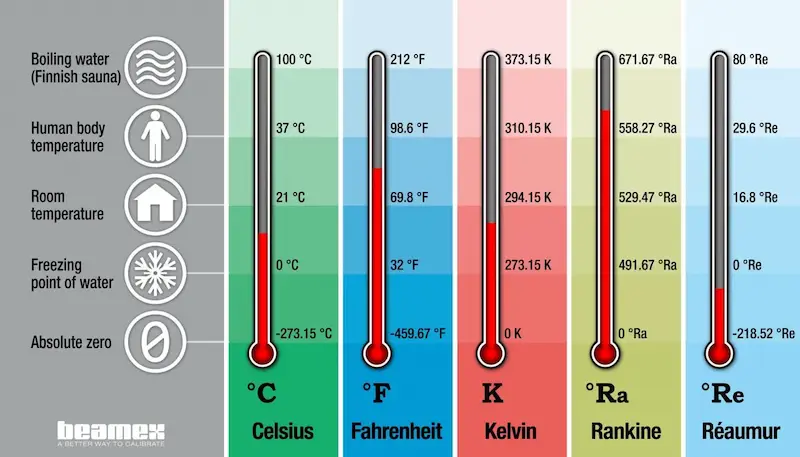
Description: Build a program that converts temperatures between Celsius, Fahrenheit, and Kelvin.
Step-by-Step Guide:
- Take temperature input from the user.
- Ask for the conversion type.
- Use conversion formulas:
- Celsius to Fahrenheit: F = (C * 9/5) + 32
- Celsius to Kelvin: K = C + 273.15
- Celsius to Fahrenheit: F = (C * 9/5) + 32
- Display the converted value.
Skills Learned: Mathematical operations, user input handling, conditional statements.
Why It’s Useful: It’s a simple but practical project that reinforces coding logic and calculations.
4. Simple Image Processing
Description: MATLAB is widely used for image processing. Start with a basic project like reading, displaying, and modifying images.
Step-by-Step Guide:
- Read an image using imread().
- Display the image with imshow().
- Convert the image to grayscale using rgb2gray().
- Apply simple operations like adjusting brightness or contrast with imadjust().
Skills Learned: Matrix operations, image processing functions, visualization.
Why It’s Useful: Image processing is a highly in-demand skill in fields like AI, robotics, and computer vision.
You may also like to read this:
Beginner MATLAB Tutorial Guide – Learn MATLAB Step By Step
MATLAB Coding Tips For Beginners – Complete Starter Guide
Step By Step MATLAB Tutorials For Beginners To Learn Fast
Practical MATLAB Programming Examples Explained Easily
5. Data Analysis Project
Description: Import data from Excel or CSV files and perform basic analysis like calculating mean, median, and standard deviation.
Step-by-Step Guide:
- Use readtable() or xlsread() to import data.
- Analyze data using functions like mean(), median(), std().
- Plot the data to visualize trends using plot() or bar().
Skills Learned: File handling, statistical analysis, data visualization, basic data manipulation.
Why It’s Useful: Real-world projects involve working with data. This project prepares you for more complex data analytics tasks.
6. Tic-Tac-Toe Game
Description: Build a simple interactive tic-tac-toe game in MATLAB.
Step-by-Step Guide:
- Create a 3×3 matrix to represent the board.
- Allow two players to input positions alternately.
- Check for winning conditions after each move.
- Display the game result (win, lose, or draw).
Skills Learned: Loops, conditional statements, arrays, game logic.
Why It’s Useful: This project is fun and teaches you problem-solving, logic implementation, and programming structure.
Additional Easy MATLAB Project Ideas
Here are more project ideas for beginners:
- Simple Banking System
- BMI Calculator
- Matrix Operations (Addition, Multiplication, Transpose)
- Alarm Clock using MATLAB GUI
- Signal Processing Basics
- Sorting and Searching Algorithms
Each of these projects will help you learn MATLAB progressively and give you confidence to take on bigger challenges.
Tips for Beginners
- Start Small: Focus on one project at a time to avoid being overwhelmed.
- Refer to Tutorials: MATLAB Central, YouTube, and official documentation are excellent resources.
- Test Frequently: Check your code often to fix errors early.
- Experiment: Modify existing projects to understand different functions and commands.
- Practice Regularly: Consistent coding improves understanding and memory retention.
FAQs
Q1: Do I need prior programming experience to try these projects?
Q2: How long does it take to complete a beginner project?
Q3: Can I use these projects for academic assignments?
Q4: Where can I find more MATLAB project ideas?
Conclusion
Starting with easy MATLAB project tutorials is the most effective way to learn MATLAB. By practicing small projects such as calculators, plotting graphs, temperature converters, data analysis, and simple games, you can gain hands-on experience and build a strong programming foundation. Remember, the key to mastering MATLAB is consistent practice, experimentation, and learning from mistakes.
With these tutorials, you’ll not only understand MATLAB better but also be ready to tackle advanced projects with confidence.