
If you’re exploring MATLAB, understanding the useful MATLAB programming tools is essential to maximize your efficiency and workflow. MATLAB is more than just a coding environment—it’s a complete platform for numerical computation, algorithm development, data analysis, and visualization. By leveraging the right tools, you can streamline tasks, solve complex problems, and produce professional-quality results.
Whether you are a beginner, student, or professional engineer, knowing these tools can help you work smarter, not harder. Let’s dive deep into the most useful MATLAB programming tools and how you can use them effectively.
1. MATLAB Editor: Your Primary Coding Workspace
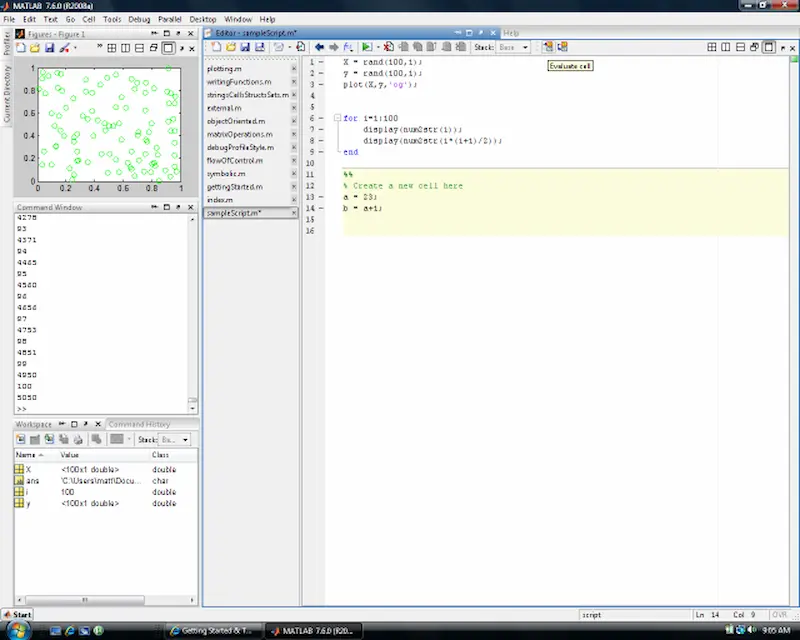
The MATLAB Editor is where you’ll spend most of your time writing scripts and functions. It’s packed with features designed to make coding easier:
- Syntax Highlighting: MATLAB automatically highlights keywords, variables, and functions. This makes your code easier to read and debug.
- Code Suggestions & Autocomplete: Save time with intelligent suggestions while you type.
- Breakpoints & Debugging Tools: Pause execution, inspect variables, and step through your code line by line.
- Code Folding: Collapse sections of code to focus on the part you’re currently working on.
Tip: Use the Editor’s Code Analyzer to identify potential problems and improve code efficiency before running scripts.
2. MATLAB Toolboxes: Specialized Libraries for Every Task
Toolboxes are collections of pre-built functions and algorithms that extend MATLAB’s capabilities. They are highly useful for specific domains:
- Signal Processing Toolbox: Analyze, filter, and visualize signals from audio, sensors, and other sources.
- Image Processing Toolbox: Enhance, segment, and analyze images for research or machine learning.
- Statistics & Machine Learning Toolbox: Perform regression, classification, clustering, and predictive modeling.
- Optimization Toolbox: Solve linear, nonlinear, and multi-objective optimization problems.
Why it’s useful: Instead of building algorithms from scratch, toolboxes give you ready-to-use functions tested by MATLAB developers, saving time and effort.
3. Simulink: Graphical Modeling for Complex Systems
Simulink is a graphical programming environment that allows you to simulate, design, and analyze dynamic systems. It’s widely used in engineering fields:
- Control Systems: Design and test controllers before deploying them in hardware.
- Automotive & Aerospace: Simulate real-world systems and analyze performance.
- Signal Processing: Test algorithms on simulated data.
Simulink’s drag-and-drop interface lets you connect blocks representing system components and see real-time results.
Pro Tip: Combine Simulink with MATLAB scripts to automate simulations and generate reports.
4. MATLAB Apps: Interactive Tools for Quick Analysis
MATLAB Apps are interactive programs within MATLAB that let you perform tasks without writing code manually. Popular apps include:
- Curve Fitting App: Fit and compare curves to experimental data.
- Signal Analyzer App: Preprocess, analyze, and visualize signal data easily.
- Image Segmenter App: Segment objects in images for analysis or machine learning.
Why use Apps: Even beginners can perform complex analyses with a few clicks, making MATLAB accessible to all skill levels.
5. MATLAB Add-Ons: Extend MATLAB Capabilities
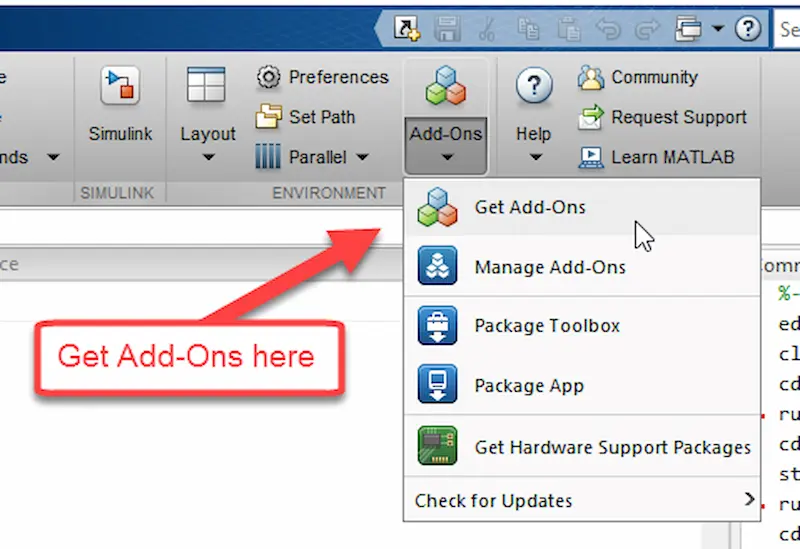
Add-Ons are downloadable extensions available through the MATLAB Add-On Explorer. They provide additional functionality, such as:
- Arduino Support Package: Control Arduino boards directly from MATLAB.
- Raspberry Pi Support Package: Connect MATLAB to Raspberry Pi for hardware projects.
- File Exchange Functions: Community-created tools to enhance MATLAB’s functionality.
Tip: Explore Add-Ons for your specific field to reduce development time and add advanced features to your projects.
6. MATLAB Live Editor: Create Interactive Documents
The Live Editor allows you to create live scripts, combining code, output, and formatted text in one interactive document. Features include:
- Interactive Outputs: Visualize plots, tables, and results alongside your code.
- Formatting Options: Add headings, formatted text, and equations for clear documentation.
- Sharing: Share live scripts with colleagues, who can run and interact with your code.
Pro Tip: Use Live Scripts for reports, tutorials, and presentations to make your work more professional.
7. MATLAB Command Window & Workspace Tools
The Command Window lets you quickly run commands, test code snippets, and debug small problems. The Workspace allows you to:
- Monitor variables and their values in real-time.
- Import and export data efficiently.
- Quickly visualize data using built-in plotting functions.
Why it’s useful: These tools make it easy to experiment with data, test functions, and understand how your code affects outputs.
You may also like to read this:
MATLAB Research Papers Explained – Complete Guide
Current MATLAB Scientific Research: Key Insights & Trends
Exploring New Discoveries MATLAB Applications In 2025
MATLAB Software Tools Guide: Complete Beginner Tutorial
Best MATLAB Add-Ons 2026: Boost Your Productivity
8. MATLAB Projects & Version Control
MATLAB Projects help you organize large projects and integrate with version control systems like Git. Features include:
- File Organization: Keep scripts, functions, data, and results structured.
- Collaboration: Track changes, work in teams, and manage project history.
- Reproducibility: Ensure your code runs reliably across different MATLAB environments.
Pro Tip: Use Projects for research or industry projects to maintain clean code structure and prevent errors.
9. MATLAB Documentation & Help Tools
MATLAB comes with extensive documentation, tutorials, and examples. Key features include:
- MATLAB Help Browser: Search for functions, examples, and syntax explanations.
- Interactive Tutorials: Learn MATLAB step by step with hands-on exercises.
- Community Forums: Access File Exchange, MATLAB Answers, and user contributions.
Why it’s useful: Even advanced users can save time by referencing built-in examples or community-contributed solutions.
Conclusion
Mastering useful MATLAB programming tools can completely transform the way you work. From the MATLAB Editor and Live Editor to toolboxes, Simulink, apps, and add-ons, each tool is designed to improve efficiency, accuracy, and creativity. By exploring and integrating these tools into your workflow, you’ll not only save time but also elevate the quality of your work.
Start experimenting with these tools today, and you’ll quickly see how they make MATLAB not just a coding environment but a powerful problem-solving platform.
FAQs: Useful MATLAB Programming Tools
1. What are MATLAB programming tools?
MATLAB programming tools are built-in features, toolboxes, apps, and add-ons that enhance MATLAB’s functionality. They help you write, debug, analyze, and visualize your code more efficiently. Examples include the MATLAB Editor, Simulink, Live Editor, and specialized toolboxes.
2. Which MATLAB tool is best for beginners?
For beginners, the MATLAB Editor and Live Editor are the most user-friendly tools. They provide syntax highlighting, code suggestions, and interactive scripts that make learning and experimenting with MATLAB easier.
3. What are MATLAB Toolboxes used for?
MATLAB Toolboxes are collections of specialized functions for specific applications. For example:
Signal Processing Toolbox: Analyzing audio and sensor data.
Image Processing Toolbox: Image enhancement and analysis.
Statistics and Machine Learning Toolbox: Data modeling and predictive analysis.
Toolboxes save time because you don’t need to write complex algorithms from scratch.
4. What is Simulink, and why is it useful?
Simulink is a graphical programming tool for modeling, simulating, and analyzing dynamic systems. It is useful for engineers working in control systems, automotive, aerospace, and signal processing because it allows real-time simulation and visualization without writing complex code.
5. What are MATLAB Apps?
MATLAB Apps are interactive tools that let you perform complex tasks without writing full code. Examples include the Curve Fitting App, Signal Analyzer App, and Image Segmenter App. They are beginner-friendly and save time for data analysis and visualization.